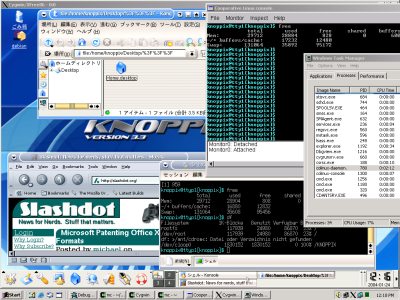
For instance, it allows one to freely run Linux on Windows 2000/XP, without using a commercial PC virtualization software such as VMware, in a way which is much more optimal than using any general purpose PC virtualization software. In its current condition, it allows us to run the KNOPPIX Japanese Edition on Windows.
Unlike in other Linux virtualization solutions such as User Mode Linux (or the forementioned VMware), special driver software on the host operating system is used to execute the coLinux kernel in a privileged mode (known as ring 0 or supervisor mode).
By constantly switching the machine's state between the host OS state and and the coLinux kernel state, coLinux is given full control of the physical machine's MMU (i.e, paging and protection) in its own specially allocated address space, and is able to act just like a native kernel, achieving almost the same performance and functionality that can be expected from a regular Linux which could have ran on the same machine standalone.
Since coLinux uses the same binary format for user-space executables as native Linux, coLinux can load and run an existing unmodified Linux distribution concurrently with the host OS.
To cooperatively share hardware with the host operating system, coLinux does not access I/O devices directly. Instead, it interfaces with emulated devices provided by the coLinux drivers in the host OS. For example, a regular file in Windows can be used as a block device in coLinux. All real hardware interrupts are transparently forwarded to the host OS, so this way the host OS's control of the real hardware is not being disturbed and thus it continues to run smoothly.
Unlike User Mode Linux, coLinux always utilizes only one process of the host OS for all its Linux processes, privately managing their scheduling, resources, and faults in a manner which is contained and entirely independent of the way the host OS is implemented. In fact, coLinux only requires a very small set of commonly exported primitives from the host OS kernel in order to work, thus, it can be rather easily ported to run under any operating system, such as Solaris, or even Linux itself.
Try to use coLinux now by downloading it at here.


Kubuntu is an official derivative of Ubuntu using the KDE environment instead of GNOME. It is part of the Ubuntu project and uses the same underlying system. It is an exciting distribution that showcases the full potential of the KDE desktop. Kubuntu shares the same repositories as Ubuntu, and relies on the same underlying architecture.
The K Desktop Environment
A powerful graphical desktop environment, combines the ease of use, contemporary functionality, and outstanding graphical design with the technological superiority of the Kubuntu operating system. KDE version 3.5.5 is the current stable release and Kubuntu 6.10 is the first distribution to include it.
Photo Management
Digikam is now included by default. This advanced digital photo management application provides you with the tools necessary to view, manage, edit, enhance, organise, tag and share photographs. Organising both photos and photo albums is a snap with Digikam as it allows you to sort chronologically, by directory layout, or by custom collections.
Power Management
Kubuntu received a new power management overhaul with the latest release. Guidance, the power management system, allows users to select various functions to control the power of their portable computing system, whether it is controlling the brightness of the display during low battery, locking the system upon closing the lid or controlling access to multiple batteries.
Easy Networking and Printer Sharing
Zeroconf and print sharing let you browse the local network for available services. Both are now simple to setup and maintain requiring nothing more than ticking a box to enable the feature.
Accessibility Profiles
Kubuntu now offers users the ability to use a preconfigured accessibility profile depending on the type of disability right from the initial point of setup. This provides users the accessibility features they need in order to not only install the Kubuntu 6.10 operating system but to use the system on a daily basis for all of their computing needs. Press F5 at the CD boot screen to choose a profile.
You can get Kubuntu now by visiting here.


