Showing posts with label linux mini. Show all posts

CrunchBang, the Debian Linux Mini

CrunchBang is a Debian GNU/Linux based distribution offering a great blend of speed, style and substance. Using the nimble Openbox window manager, it is highly customisable and provides a modern, full-featured GNU/Linux system without sacrificing performance.

The primary aim of the CrunchBang project is to produce a stable distribution offering the best possible out-of-the-box Openbox experience. To achieve this goal, CrunchBang pulls many base packages directly from Debian's repositories, which are well-known for providing stable and secure software. Packages from CrunchBang's own repositories are then customised and pinned to the system to produce what is known as the CrunchBang distro.
Put simply; CrunchBang could be thought of as a layer built on top of Debian, specifically to provide a great Openbox experience.
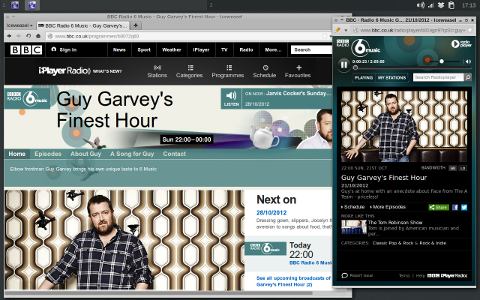


CrunchBang uses the Openbox window manager. Openbox is lightweight and speedy, and as a result, CrunchBang is fast. Also, whilst CrunchBang is not primarily designed for older systems, it has been reported to operate very well where system resources are limited. Once installed, CrunchBang should boot-up and operate faster than a regular Debian GNOME/KDE installation.

Openbox is a highly configurable window manager. It allows you to change almost every aspect of how you interact with your desktop and invent completely new ways to use and control it. It can be like a video game for controlling windows. But Openbox can also be kept extremely simple, as it is in the default setup, meaning that it can suit just about anybody. Openbox gives you control without making you do everything. 

CrunchBang also comes with many applications chosen specifically for their hackability attributes. These include Conky, the customisable system monitor tool, and Thunar, the popular and highly configurable file manager.

CrunchBang comes with the ability to play most popular media formats, including but not limited to MP3, DVD playback and Adobe Flash. CrunchBang also comes with many popular applications installed by default, including but not limited to Iceweasel (Firefox) browser , GNOME media player and Transmission BitTorrent Client. 

With the exception of a few packages, CrunchBang is built entirely from packages available from the Debian repositories. CrunchBang uses the same APT package management tools and update manager. If you are already familiar with Debian or Ubuntu, you should have no trouble working with CrunchBang.

So CrunchBang is
  • It is ready for use after installation
  • Looks good
  • Fast on my SSD
  • Nice people, who actually helps, if problems with linux- newbie.
 You can download CrunchBang at here.

Picuntu Linux Mini PC - 8GB Flash Power By MK902 LE

A truly desktop class Mini ARM Linux PC, the MK902 LE is here,  packed into a tiny a form factor that includes more connectivity options than any of our previous Linux Mini PC's. The future of small, efficient ARM desktop computers starts here.

The Cloudsto MK902 LE is a tiny computer, which runs Ubuntu Linux and sits neatly on any desk (or behind a monitor/display) giving easy access to all connections this allows it to be used as a mini workstation. At the heart of this tiny device is a powerful 1.6Ghz Quad-Core Cortex A9 ARM processor for blazing performance in all applications.


This Mini Linux PC connects to any HDMI or DVI compatible screen to provide a true 1080p multimedia digital display.
The Cloudsto MK902 LE Mini Linux ARM PC has 2GB of RAM, built in Wifi & Ethernet, 4 x USB 2.0 ports, Fast onboard flash storage and runs Ubuntu (Picuntu) desktop OS at full speed. Now it really is possible to browse the internet, read email, manage files, edit photos, make documents, make music and even watch TV in true desktop style using a PC which fits in the palm of your hand and costs the same as an external hard drive!

Picuntu is a Linux distribution optimised for ARM devices, basically its a version of Ubuntu Linux which is the 3rd most popular operating system in the world... and whats more, its FREE... and so is all the software for it!

When you start Picuntu you land on the desktop, a familiar place to be if you are used to Windows and Mac computers. From here you can browse the internet, check mail, manage files, create documents, make websites, edit photos, listen to music and much much more with the many built in applications. If you fancy doing more you can launch the Ubuntu software Center and download 1000's more applications specifically designed for ARM Linux.


MK902 LE is ideal for a wide range of applications;
  • Replacing large power hungry and expensive desktop computers in business environments
  • Digital signage applications
  • Web Kiosks
  • Thin Client
  • Server (runs full Ubuntu to allow complete configuration for all server needs)
  • Development platform for users involved in embedded solutions and researching fast ARM platforms
  • As a client for many other applications and tasks, freeing up the need for using a dedicated desktop machine for the job in hand
This platform also offers the following advantages;
  • Boots up in seconds
  • Very low power consumption (2-5 Watts under normal load)
  • Tiny form factor
  • Completely solid state (no moving parts)
  • Runs industry standard Linux distribution Ubuntu
  • Easy to deploy (firmware can be flashed by PC)
  • Low cost compared to WinTel boxes
  • No software licenses to worry about
Specifications
CPU - Rockchip RK3188 Quad Core (Cortex A9 Quad Core upto 1.6GHz)
GPU - Mali 400 Supports Open GL ES 1.1 and 2.0 (Linux support available in Ubuntu 12.04)
Memory (RAM) - 2GB
Internal Storage - 8GB Internal NAND FLASH with Ubuntu preinstalled
External Storage - Micro SD Card Slot
System - Ubuntu Linux (Ubuntu 12.04 LTS) Full Ubuntu OS with access to many apps from Ubuntu software center.
Networking - Wifi 802.11b/g/n with external high gain Antenna, Fast Ethernet
Video - HDMI up to 1920x1080p,
Analogue AV output (Linux support coming soon)
Audio - HDMI or External USB Sound Device (not included), 3.5mm AV output, optical output (Linux Support coming soon)
USB - 4 x Full Size USB Host.
Other Hardware Features - PMU (for complete software shutdown), Easily accessible recovery switch.
Power - 5V USB <2 amps="" p="">
Package Contents
MK902 LE 8GB (Linux Edition)
USB - USB cable for easy firmware installation/updates/recoveries.
HDMI - HDMI Lead
2A Mains USB Power supply with country specific adapter.

You can get MK902 LE at here.

ZEN-mini 2010 has been released

ZEN-mini 2010 or ZEN, based on PCLinuxOS, is a minimal Linux livecd that is bootable and can be installed. It comes with a very basic GNOME desktop without additional applications. It is designed for advanced users or for users who wish to learn how to customize their system with the applications and support files they want to use.

Additional software can be installed through the Synaptic Software Manager (requires network connection). Add your own background, window decorations, web browser client, email client, music client and fully trick out your desktop the way you want it.

Now, ZEN-mini 2010 has been released. Built with GNOME 2.30, kernel 2.6.32.11 bfs, addlocale, and including fixed pulse audio.

You can download this mini PCLinuxOS at Here. ISO size only 343mb!


Live Hacking CD: Linux for IT Pro's

Live Hacking CD is a new Linux distribution packed with tools and utilities for ethical hacking, penetration testing and countermeasure verification. Based on Ubuntu this ‘Live CD” runs directly from the CD and doesn’t require installation on your hard-drive. Once booted you can use the included tools to test, check, ethically hack and perform penetration tests on your own network to make sure that it is secure from outside intruders.

As well as the standard Linux networking tools like ping, wget, curl, telnet and ssh, the Live Hacking CD has tools for DNS enumeration and  reconnaissance as well as utilities for foot-printing, password cracking and network sniffing. It also has programs for spoofing and a set of wireless networking utilities.

DNS Enumeration
DNS is the Internet service that translates domain names into IP addresses. Each time you use a domain name, DNS is used to translate the name into the corresponding IP address. To do the translation DNS holds records for each domain. The Live Hacking CD includes tools specifically designed for working with DNS.

Reconnaissance
Just like in the military the first step to any mission is reconnaissance; exploring the network to gain information. The idea is to map out the target network and systems before trying to find the potential security weaknesses. Included on the Live Hacking CD are a set of tools to help you perform reconnaissance on your network.

Foot-printing
Once the network has been mapped out, you need to gather information about the specific computers on the network. To help you do this the Live Hacking CD includes the tools you need.

Password Cracking
While trying to penetrate your network you will need to test the strength of the passwords being used. The Live Hacking CD has the tools you need to try and crack the passwords used on your network and on your systems.

Network Sniffing
The technique used to monitor and analyze the traffic on your network is called network sniffing (or some times data packet sniffing). Here a packet sniffer captures the packets of data that pass around the network. Within your network you may find that usernames and passwords are being sent in clear text meaning that the information would be viewable to anyone who can capture your network traffic. The Live Hacking CD contains network sniffing tools to enable you to capture, monitor and analyze your network traffic.

Spoofing (or Masquerading)
Spoofing is the creation of network packets in such a way that they appear as if they came from somewhere or someone else. Spoofing is an integral part of many network attacks and the Live Hacking CD has the tools you need to help you create fake network traffic in order to penetrate your network.

Wireless Networking Utilities
Many networks now use Wi-Fi to enable laptops and mobile devices to connect to the network without wires. The strength and simultaneously the weakness of Wi-Fi is that the network traffic is broadcast to every device. The Live Hacking CD is packed with tools to help you monitor and secure your wireless network.

Open Source and Ethical:
The Live Hacking CD is designed for ethical computer hacking, meaning that it contains the tools and utilities you need to test and hack your own network but using the tools and techniques that more malicious hackers would use.

The Live Hacking CD is based on open source technology and uses the popular Ubuntu Linux distribution as its base. All the tools included can be freely found in either the Ubuntu repositories on the Internet. The CD is designed to be a platform to help (as well as those with a general interest in information security) to start, understand and conduct penetration tests and ethical hacking.

Dr. Jahangiri, the world renowned security expert and the brain-child behind the Live Hacking CD, has made it available to the public for free to encourage IT professionals and others to enhance their knowledge and to prepare for the malicious activities of the unscrupulous hacker.

You can download this new Linux distro at Here.

Laptop For Linux DesktopLinux

Nowadays, Laptop For Linux DesktopLinux at this time is getting a lot of places in the heart of the user's notebook or laptop. Various reasons cited by the Linux user this. Starting from the classic problems such as the license is due to the excess-surplus offered by Linux. Even a switch to Linux because it is already bored with the look and the old OS because it is often fed back to install:)


For that I tried to explain here specification laptop / notebook that is suitable and have the hardware that is already well known by Linux Desktop at this time. Here I do not mention brands, but you can from it hardwarenya specifications.

I write the course outline based on my own experience:

1. Processor
Both Intel and AMD at this time already well known to all the technology in Linux that are popular at this time.

2. Video chipset
All video chipset that is currently already can run linux with a graphical display standards. For at least the 3D chipset is from Intel. Ranging from 945 up to Intel X1300. This chipset is directly running 3D to run Compiz Fusion on Linux.
To run a more 3D, please select the weight of a chipset from NVidia or ATI, and if its video memory can be dedicated (not shared from RAM). Both chipset requires drivers retired in Linux.

3. Wifi Chipset
Intel is still so great in the introduction harware directly on Linux. For other chipsets such as Broadcom and Atheros also a retired driver in linux, can also use ndiswrapper.

4. Hard disk.
I think the hard drive is well recognized by both the linux IDE and SATA.

5. Network Card
All Network Card Laptop chipset at this time has also been well recognized by linux.

6. Webcam / Camera
This is still quite difficult. Due to some new vendors only add the drivers for linux, also the installation manual. Chipset Webcam that can be run on linux with the drivers that I know belong to a new chipset and Acer microdia.

7. Internal Modem
Most have been recognized by linux at this time. If that is not detected may indeed require a special driver.

In general that I can review the specifications of laptop or notebook to run Linux well. This is different from the UMPC at this time that already include the OS on Linux, of course all the hardware is already running well.

From the results of the survey, I still centrino laptop with the specification from Intel (Intel chipset from the motherboard, processor, wifi, video) is the right choice when we do not want to fuss with driver installation in linux.

Tiny Core Linux, a Very Small Linux Desktop


Tiny Core Linux is a very small (10 MB) minimal Linux Desktop. It is based on Linux 2.6 kernel, Busybox, Tiny X, Fltk, and Jwm. The core runs entirely in ram and boots very quickly.

Tiny Core Linux, not being a complete Desktop, requires the internet to access to our repository of applications. Everyone should take the time to read this document and understand the design philosophy behind Tiny Core Linux. This will insure a more pleasant experience.

It is not a complete desktop nor is all hardware completely supported. It represents only the core needed to boot into a very minimal X desktop typically with wired internet access.

The user has complete control over which applications and/or additional hardware to have supported, be it for a desktop, a nettop, an appliance, or server, selectable from our online repository.

You can download this small Linux at Here.


Turn your PC into Media Center with GeeXBox

GeeXboX is a free embedded Linux distribution which aims at turning your computer into a so called HTPC (Home Theater PC) or Media Center. Being a standalone LiveCD-based distribution, it's a ready to boot operating system than works on any Pentium-class x86 computer or PowerPC Macintosh, implying no software requirement. You can even use it on a diskless computer, the whole system being loaded in RAM.


Despite his tiny ISO image size, the distribution comes with a complete and automatic hardware detection, not requiring any driver to be added. It supports playback of nearly any kind of audio/video and image files and all known codecs and containers are shipped in, allowing playing them through various physical supports, either being CD, DVD, HDD, LAN or Internet.

GeeXboX also comes with a complete tool-chain that allows developers adding easily extra packages and features but that might also be used to give birth to many dedicated embedded Linux systems.

The curent version of GeeXBox is 1.2-beta1 with major changes of adding widescreens and HDTV screens support and adding X11 video acceleration for most graphic cards (Intel, nVidia, ATI, S3, SiS, VIA ...).

The whole distributions is now modularized to best detect your hardware and load ony what is needed. Many drivers have been added and installation has been completely reworked for better usability.

This beta version that can be downloaded here, also has been optimized for various platforms like EeePCs, EasyGate and bring official support of MacIntels computers. It also introduce a new port to x86_64 architecture which brings a small performance boost regarding to the 32bit edition.

Puppy Linux 4.1 has been released


Puppy Linux, a small, light and mini Linux has released the version 4.1. As described on its release notes, Puppy 4.00 was a major upgrade from 3.01, with just about everything overhauled and updated.

Now, the version 4.1 continues the hectic pace of development, with ground-breaking new applications and under-the-hood architectural improvements over 4.00. Ground-breaking apps include our new Psip VOIP and PPLOG personal blog. Under-the-hood includes faster boot times, much better hardware detection, and new 'pup_event' architecture (including desktop drive icons).

The live-CD file is 'puppy-4.1-k2.6.25.16-seamonkey.iso' at 94.1MB and 'puppy-4.1retro-k2.6.21.7-seamonkey.iso' at 94.6MB. The latter is a more conservative kernel that perhaps suits older systems.

You can get this new version of Puppy Linux at Here.

Toorox Live, another Gentoo based distro

Toorox is a Linux Live-DVD based on Gentoo that starts as a bootable media using KNOPPIX technology. While the system is booting, all necessary drivers will be included automatically.


Toorox is only using the memory and an existing swap partition at runtime, so your hard disks won't be touched by default. Currently, Toorox use the latest stable KDE 4.1.0.

Minimum equipment:
i686 CPU (Pentium II and faster) + 256MB RAM + DVD

Optimum equipment:
Multi-Core CPU + 1GB RAM + DVD

Some examples to use it:

  • Backup data
  • Secure internet browsing
  • Look and feel for Linux rookies
  • Hard disk installation

Owners of Radeon VGA-Cards should notice improvements, because the free radeonhd driver is now installed and has been added to the hardware-detection. The 3D-Desktop should run well now, too after installing the proprietary ATI driver.

It contains the brand-new Firefox 3.0 and Epiphany has now been added to Toorox. for web browsing, too. Wine was updated to Version 1.0.Kontact and Kmail are back now in Toorox-KDE4.

More info and download links about this distro can be reached at here.

Highlights of Kubuntu 8.04.1

Kubuntu is an official derivative of Ubuntu using the KDE environment instead of GNOME. It is part of the Ubuntu project and uses the same underlying system. It is an exciting distribution that showcases the full potential of the KDE desktop. Kubuntu shares the same repositories as Ubuntu, and relies on the same underlying architecture.


The K Desktop Environment
A powerful graphical desktop environment, combines the ease of use, contemporary functionality, and outstanding graphical design with the technological superiority of the Kubuntu operating system. KDE version 3.5.5 is the current stable release and Kubuntu 6.10 is the first distribution to include it.

Photo Management

Digikam is now included by default. This advanced digital photo management application provides you with the tools necessary to view, manage, edit, enhance, organise, tag and share photographs. Organising both photos and photo albums is a snap with Digikam as it allows you to sort chronologically, by directory layout, or by custom collections.

Power Management

Kubuntu received a new power management overhaul with the latest release. Guidance, the power management system, allows users to select various functions to control the power of their portable computing system, whether it is controlling the brightness of the display during low battery, locking the system upon closing the lid or controlling access to multiple batteries.

Easy Networking and Printer Sharing

Zeroconf and print sharing let you browse the local network for available services. Both are now simple to setup and maintain requiring nothing more than ticking a box to enable the feature.
Accessibility Profiles


Kubuntu now offers users the ability to use a preconfigured accessibility profile depending on the type of disability right from the initial point of setup. This provides users the accessibility features they need in order to not only install the Kubuntu 6.10 operating system but to use the system on a daily basis for all of their computing needs. Press F5 at the CD boot screen to choose a profile.

You can get Kubuntu now by visiting here.

Damn Small Linux 4.4.4 is out

Damn Small Linux (DSL) is a very versatile 50MB mini desktop oriented Linux distribution. DSL was originally developed as an experiment to see how many usable desktop applications can fit inside a 50MB live CD. It was at first just a personal tool/toy. But over time Damn Small Linux grew into a community project with hundreds of development hours put into refinements including a fully automated remote and local application installation system and a very versatile backup and restore system which may be used with any writable media including a hard drive, a floppy drive, or a USB device.


DSL has a nearly complete desktop, and many command line tools. All applications are chosen with the best balance of functionality, size and speed. Damn Small also has the ability to act as an SSH/FTP/HTTPD server right off of a live CD. In our quest to save space and have a fully functional desktop we've made many GUI administration tools which are fast yet still easy to use. What does DSL have?

XMMS (MP3, CD Music, and MPEG), FTP client, Dillo web browser, Netrik web browser, FireFox, spreadsheet, Sylpheed email, spellcheck (US English), a word-processor (Ted), three editors (Beaver, Vim, and Nano [Pico clone]), graphics editing and viewing (Xpaint, and xzgv), Xpdf (PDF Viewer), emelFM (file manager), Naim (AIM, ICQ, IRC), VNCviwer, Rdesktop, SSH/SCP server and client, DHCP client, PPP, PPPoE (ADSL), a web server, calculator, generic and GhostScript printer support, NFS, Fluxbox and JWM window managers, games, system monitoring apps, a host of command line tools, USB support, and pcmcia support, some wireless support.

Damn Small is small enough and smart enough to do the following things:

  • Boot from a business card CD as a live linux distribution (LiveCD)
  • Boot from a USB pen drive
  • Boot from within a host operating system (that's right, it can run inside Windows)
  • Run very nicely from an IDE Compact Flash drive via a method we call "frugal install"
  • Transform into a Debian OS with a traditional hard drive install
  • Run light enough to power a 486DX with 16MB of Ram
  • Run fully in RAM with as little as 128MB (you will be amazed at how fast your computer can be!)
  • Modularly grow -- DSL is highly extendable without the need to customize.

Download this new DSL version at Here.

SliTaz 1.0, The Smallest Desktop Distro On Earth

SliTaz GNU/Linux is a free operating system working completely in memory from removeable media such as a cdrom or USB key. It is light, speedy and fully installable on a hard drive.

SliTaz GNU/Linux is a mini distribution and live CD designed to run speedily on hardware with 128 MB of RAM. SliTaz uses BusyBox, a recent Linux kernel and GNU software. It boots with Syslinux and provides more than 200 Linux commands, the lighttpd web server, SQLite database, rescue tools, IRC client, SSH client and server powered by Dropbear, X window system, JWM (Joe's Window Manager), gFTP, Geany IDE, Mozilla Firefox, AlsaPlayer, GParted, a sound file editor and more. The SliTaz ISO image fits on a less than 30 MB media and takes just 80 MB of hard disk space.

SliTaz is distributed in the form of a LiveCD that you can easily burn to a cdrom and boot from. When the system is running you can eject the LiveCD and use your CD drive for other tasks.

The Live system provides a fully-featured, working graphical distro and lets you keep your data and personal settings on persistent media. The system can be extended with the Tazpkg package manager and security updates are provided for the cooking and stable versions.

Features:

  • Root filesystem taking about 80 MB and ISO image less than 30 MB.
  • Ready to use Web server powered by LightTPD with CGI and PHP support.
  • Browse the Web with Mozilla Firefox or Retawq in text mode.
  • Sound support provided by Alsa mixer, audio player and CD ripper/encoder.
  • Chat, mail and FTP clients.
  • SSH client and server powered by Dropbear.
  • Database engine with SQLite.
  • Generate a LiveUSB device.
  • Tools to create, edit or burn CD or DVD images.
  • Elegant desktop with JWM running on the top of Xvesa (X server).
  • Home made graphical boxes to command line utilities.
  • More than 440 packages easily installable from the mirror.
  • Active and friendly community.

Btw, you can get SliTaz GNU/Linux by visiting here.

Poseidon Linux: Ubuntu for Scientist

Poseidon Linux based on open source software and aimed at the Brazilian/International scientific community was designed as a friendly and complete desktop. This operating system is based on Ubuntu and inspired by Quantian Linux. It offers several specific tools in the areas of GIS, 3D Visualization, Mathematics, Statistics and several otherfields of research. It also has all the software expected in a modern desktop such as an office suite - with spell checker, web browsers, e-mail readers, instant messaging, to cite but a few.

With Poseidon Linux 3.0 we start a new era, since the new release supports Brazilian Portuguese, Spanish, English and German. Poseidon Linux is here!

Poseidon Linux is a GNU/Linux distribution. It was designed for the academic and scientific community, following the need for a friendly and complete desktop based on open source software. It includes a large number of scientific applications, covering areas such as: GIS and Geostatistics, Visualization 2D/3D/4D, Mathematics, Statistics, Physics, Chemistry, CAD / Engineering, Computer Graphics, Image Editing and Vectorial Drawing, Numeric modelling / Simulation, Scientific graphs, Scientific Authoring, Database, Programming languages

Poseidon Linux 3.0 also offers all software needed to make it a complete workstation - office suite, web browser, e-mail readers, instant messaging, among others. You can get Poseidon Linux 3.0 by downloading at Here.

Zenwalk Live 5.2 Live CD is Available Now

Zenwalk 5.2 Live CD, based on Zenwalk current and a slightly modified version 6.2.3 of the Linux Live Scripts, Zenwalk Live is meant to be an almost perfect clone of Zenwalk standard, although it now uses a slightly modified kernel in order to unlock specific Live CD features such as, for example, the re-mastering of Zenwalk Live on a USB key with persistent changes.


As always, Zenwalk live features several specific Live CD GUI tools which you will find in Zenpanel (Zenwalk's system configuration panel)... Zen Installer will enable you to install Zenwalk standard on your machine while Live Clone, a WYSIWYG Live CD re-mastering utility, will enable you to generate your very own customized Live CD that will carry any of the changes you may have applied to your Live CD session, whether these changes were simply cosmetic, like a change of wall paper or panel widgets or whether they were more involved like the suppression or addition of different programs, users, etc..

Essential recovery & system tools such as LiloFix, Gparted & Testdisk have not been forgotten & are also available... just in case!

Evidently, Zenwalk Live 5.2 includes all the latest improvements from Zenwalk 5.2 recent release: the suspend and resume refined functions, the new support for blue-tooth input device, the refreshed artwork for the booting menu, boot splash & Xfce environment, as well as the nearly 500 changes to software packages, including Linux kernel 2.6.25.4, Xfce Desktop 4.4.2, Netpkg "new generation" version 4, Xorg version 7.3, Mplayer coupled with the latest dvdnav (DVD menus support), etc..

You can get Zenwalk 5.2 Live CD by downloading at at Here.

MilaX, the OpenSolaris Live CD

MilaX is a small-size live-CD distribution which runs completely off a CD or a USB storage device. It is based on OpenSolaris Nevada and includes its basic features. It originally started as an experiment to see how much OpenSolaris software could fit on a mini-CD, but it eventually became a full-fledged OpenSolaris distribution.


It is also possible to use MilaX as a rescue CD. It can be installed on storage media with a small capacity, including bootable business cards, USB flash drives, memory cards, and Zip drives. By the way, MilaX is free to use, modify and distribute.

The current version of Milax requires at least 256MB RAM and a Pentium or Celeron to boot into a IceWM desktop. 128MB RAM is sufficient for booting into Command-Line mode.

Download Milax for HDD, live CD, USB Flashdisk or Server by visiting here.


Myah OS 3.0 Box Has Been Released

Myah OS is a complete Linux solution built around the Lightweight X11 Desktop Environment. The LXDE desktop is designed to be the smallest, fastest and yet fully functional desktop for UNIX/Linux systems.


It's important to note that Box is not meant to be a light system. Instead it's meant to be a fully functional system built around a light desktop. There are many extremely light Linux systems out there already like Damn Small Linux and Slax.

Myah OS 3.0 Box is for people who want a full blown system built around a light desktop. Box comes with much of the same software that was found in Mouse Pro.

You can download the ISO of Myah OS 3.0 Box at Here.

Ultimate Edition 1.8 has been Released

Ultimate Edition 1.8, an Ubuntu-based distribution featuring a variety of user-friendly enhancements, has been released.

Ultimate Edition 1.8 is built based off Ubuntu Hardy Heron, unlike previous builds which were created by a tool called reconstructor the development team built this one by hand. it is by far their best work. The team releasing both a 32 bit & a 64 Bit edition. Hotrod is a fitting name for it, if you have a 64 bit processor it highly recommend the 64 bit edition.


This release was built from scratch using Ubuntu Hardy Heron LTS with all the goodies pre-added, you have came to love with previous editions & a few new ones.

Btw, you can download the ISO of Ultimate Edition 1.8 at here or if you prefer to download torrent by visiting here.


TinyMe 2008.0 is out

First stable version of TinyMe, a PCLinuxOS based mini distribution that designed for older computers and people who want a very light and fast desktop environment, is out.

Although TinyMe comes as a small, 200MB ISO, it provides tools for most all of your everyday wants and needs:

  • AbiWord Word Processor
  • Opera Web Browser
  • Audacious Media Player
  • GThumb Photo Viewer and Digital Camera application
  • Asunder CD ripper
  • Easy-to use Control Centers which make customizing your system and desktop look 'n feel a snap.
  • Sylpheed E-Mail Client
  • ePDFView, a PDF Viewer
  • SciTE text editor
  • and even a couple of small games.

TinyMe's desktop environment consists of Openbox for the window manager, LXPanel for the panel, Nitrogen sets the wallpaper, and iDesk provides the icons.

More info, forum, IRC and Wiki of TinyMe can be reached at here, and you can download this new version of it at here.

Elyssa (Linux Mint 5) RC2 has been Released

This is the second release candidate for Linux Mint 5, codename Elyssa, based on Daryna and compatible with Ubuntu Hardy and its repositories.

Some changes was changed in this new release are: mintMenu improvements, mintUpdate improvements, mintInstall improvements, Desktop improvements, Performance improvements, Better Look and feel, Better Localization and documentation, Upstream improvements with PulseAudio and more.


Now, more software available on Linux Mint 5 Elyssa with supported by CNR, which features commercial services and applications which are not available via the traditional channels.

A new Mint tool called mintBackup was developed and added to Elyssa. This tool provides an easy way to save the content of your home folder into a single .backup file. You can then restore this content later on or somewhere else by double clicking on it.

Complete list changes can be seen at Elyssa's announcement, and more details on this new release can be found at here. Btw, you can download the ISO of Linux Mint 5 Elyssa at here.

Puppy Linux 4.00 Has Been Released

The development team of Puppy Linux has announced availability of new release of Puppy Linux, a major updated of the minimalist desktop distribution. Its the 4.00 version.

For who don't know, Puppy Linux is yet another Linux distribution. What's different here is that Puppy is extraordinarily small, yet quite full featured. Puppy boots into a 64MB ram disk, and that's it, the whole caboodle runs in RAM.

Unlike live CD distributions that have to keep pulling stuff off the CD, Puppy in its entirety loads into RAM. This means that all applications start in the blink of an eye and respond to user input instantly. Puppy Linux has the ability to boot off a flash card or any USB memory device, CDROM, Zip disk or LS/120/240 Superdisk, floppy disks, internal hard drive. It can even use a multi session formatted CD-R/DVD-R to save everything back to the CD/DVD with no hard drive required at all!

Now, this Puppy has all drivers built-in for scanning, digital camera, printing (Gutenprint), audio recording/editing/conversion, making it a complete multimedia environment ...yet is only 87.1 MB!!! Of course this is in addition to being a complete office environment, in addition to having a huge collection of useful utilities, in addition to anything else you can think of...

Alternative 4.00 live-CD with 2.6.25 kernel
The 'standard' build of Puppy 4.00 is file puppy-4.00-k2.6.21.7-seamonkey.iso, which is 87.1MB, compare that with Puppy 3.01 'standard' (with much less functionality) which is 98.6MB!

The team have also built puppy-4.00-k2.6.25-seamonkey.iso, using the latest Linux kernel. This may not be quite as mature for wireless network connectivity though. Choose this one if you want support for a dual-core CPU (but the 'standard' build with mono-core 2.6.21.7 kernel works on dual-core systems). Also, strangely enough, we have more success booting older PCs with the 2.6.23 and later kernels, so try this one if Puppy fails to boot.

The 2.6.25 kernel is configured with the unified /dev/sd* and /dev/sr* drive naming, which may cause some difficulty if you need to configure GRUB.

For more information about Puppy Linux can be reached on its site. Btw, you can download ISO of this new Puppy Linux (only 87 MB) at here.

Delicious Digg Technorati Reddit Furl BlinkList Yahoo! NewsVine Netscape Google Live Bookmark Netvouz Squidoo StumbleUpon Magnolia.png