CrunchBang, the Debian Linux Mini

CrunchBang is a Debian GNU/Linux based distribution offering a great blend of speed, style and substance. Using the nimble Openbox window manager, it is highly customisable and provides a modern, full-featured GNU/Linux system without sacrificing performance.

The primary aim of the CrunchBang project is to produce a stable distribution offering the best possible out-of-the-box Openbox experience. To achieve this goal, CrunchBang pulls many base packages directly from Debian's repositories, which are well-known for providing stable and secure software. Packages from CrunchBang's own repositories are then customised and pinned to the system to produce what is known as the CrunchBang distro.
Put simply; CrunchBang could be thought of as a layer built on top of Debian, specifically to provide a great Openbox experience.
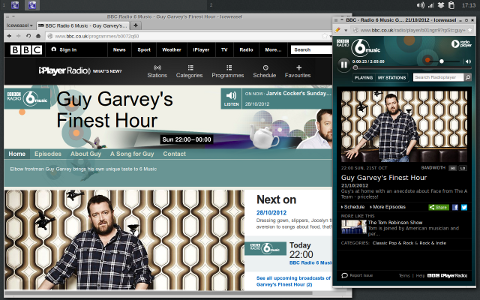


CrunchBang uses the Openbox window manager. Openbox is lightweight and speedy, and as a result, CrunchBang is fast. Also, whilst CrunchBang is not primarily designed for older systems, it has been reported to operate very well where system resources are limited. Once installed, CrunchBang should boot-up and operate faster than a regular Debian GNOME/KDE installation.

Openbox is a highly configurable window manager. It allows you to change almost every aspect of how you interact with your desktop and invent completely new ways to use and control it. It can be like a video game for controlling windows. But Openbox can also be kept extremely simple, as it is in the default setup, meaning that it can suit just about anybody. Openbox gives you control without making you do everything. 

CrunchBang also comes with many applications chosen specifically for their hackability attributes. These include Conky, the customisable system monitor tool, and Thunar, the popular and highly configurable file manager.

CrunchBang comes with the ability to play most popular media formats, including but not limited to MP3, DVD playback and Adobe Flash. CrunchBang also comes with many popular applications installed by default, including but not limited to Iceweasel (Firefox) browser , GNOME media player and Transmission BitTorrent Client. 

With the exception of a few packages, CrunchBang is built entirely from packages available from the Debian repositories. CrunchBang uses the same APT package management tools and update manager. If you are already familiar with Debian or Ubuntu, you should have no trouble working with CrunchBang.

So CrunchBang is
  • It is ready for use after installation
  • Looks good
  • Fast on my SSD
  • Nice people, who actually helps, if problems with linux- newbie.
 You can download CrunchBang at here.

Picuntu Linux Mini PC - 8GB Flash Power By MK902 LE

A truly desktop class Mini ARM Linux PC, the MK902 LE is here,  packed into a tiny a form factor that includes more connectivity options than any of our previous Linux Mini PC's. The future of small, efficient ARM desktop computers starts here.

The Cloudsto MK902 LE is a tiny computer, which runs Ubuntu Linux and sits neatly on any desk (or behind a monitor/display) giving easy access to all connections this allows it to be used as a mini workstation. At the heart of this tiny device is a powerful 1.6Ghz Quad-Core Cortex A9 ARM processor for blazing performance in all applications.


This Mini Linux PC connects to any HDMI or DVI compatible screen to provide a true 1080p multimedia digital display.
The Cloudsto MK902 LE Mini Linux ARM PC has 2GB of RAM, built in Wifi & Ethernet, 4 x USB 2.0 ports, Fast onboard flash storage and runs Ubuntu (Picuntu) desktop OS at full speed. Now it really is possible to browse the internet, read email, manage files, edit photos, make documents, make music and even watch TV in true desktop style using a PC which fits in the palm of your hand and costs the same as an external hard drive!

Picuntu is a Linux distribution optimised for ARM devices, basically its a version of Ubuntu Linux which is the 3rd most popular operating system in the world... and whats more, its FREE... and so is all the software for it!

When you start Picuntu you land on the desktop, a familiar place to be if you are used to Windows and Mac computers. From here you can browse the internet, check mail, manage files, create documents, make websites, edit photos, listen to music and much much more with the many built in applications. If you fancy doing more you can launch the Ubuntu software Center and download 1000's more applications specifically designed for ARM Linux.


MK902 LE is ideal for a wide range of applications;
  • Replacing large power hungry and expensive desktop computers in business environments
  • Digital signage applications
  • Web Kiosks
  • Thin Client
  • Server (runs full Ubuntu to allow complete configuration for all server needs)
  • Development platform for users involved in embedded solutions and researching fast ARM platforms
  • As a client for many other applications and tasks, freeing up the need for using a dedicated desktop machine for the job in hand
This platform also offers the following advantages;
  • Boots up in seconds
  • Very low power consumption (2-5 Watts under normal load)
  • Tiny form factor
  • Completely solid state (no moving parts)
  • Runs industry standard Linux distribution Ubuntu
  • Easy to deploy (firmware can be flashed by PC)
  • Low cost compared to WinTel boxes
  • No software licenses to worry about
Specifications
CPU - Rockchip RK3188 Quad Core (Cortex A9 Quad Core upto 1.6GHz)
GPU - Mali 400 Supports Open GL ES 1.1 and 2.0 (Linux support available in Ubuntu 12.04)
Memory (RAM) - 2GB
Internal Storage - 8GB Internal NAND FLASH with Ubuntu preinstalled
External Storage - Micro SD Card Slot
System - Ubuntu Linux (Ubuntu 12.04 LTS) Full Ubuntu OS with access to many apps from Ubuntu software center.
Networking - Wifi 802.11b/g/n with external high gain Antenna, Fast Ethernet
Video - HDMI up to 1920x1080p,
Analogue AV output (Linux support coming soon)
Audio - HDMI or External USB Sound Device (not included), 3.5mm AV output, optical output (Linux Support coming soon)
USB - 4 x Full Size USB Host.
Other Hardware Features - PMU (for complete software shutdown), Easily accessible recovery switch.
Power - 5V USB <2 amps="" p="">
Package Contents
MK902 LE 8GB (Linux Edition)
USB - USB cable for easy firmware installation/updates/recoveries.
HDMI - HDMI Lead
2A Mains USB Power supply with country specific adapter.

You can get MK902 LE at here.

Bio-Linux has been released !

Bio-Linux is an ideal system for scientists handling and analysing biological data.
Bio-Linux 6.0 is a fully featured, powerful, configurable and easy to maintain bioinformatics workstation. Bio-Linux provides more than 500 bioinformatics programs on an Ubuntu Linux 10.04 base. There is a graphical menu for bioinformatics programs, as well as easy access to the Bio-Linux bioinformatics documentation system and sample data useful for testing programs. You can also install Bio-Linux packages to handle new generation sequence data types.


You can install Bio-Linux on your machine, either as the only operating system, or as part of a dual-boot setup which allows you to use your current system and Bio-Linux on the same hardware.

Bio-Linux also runs Live from the DVD or a USB stick. This runs in the memory of your machine and does not involve installing anything. This is a great, no-hassle way to try out Bio-Linux, demonstrate or teach with it, or to work with when you are on the move.

Bio-Linux is built on open source systems and software, and so is free to to install and use. See What's new on Bio-Linux 6.0. Also, check out the  2006 paper on Bio-Linux and open source systems for biologists.

Getting Bio-Linux is simple. Just download the image, burn it to a DVD or USB stick and boot the machine from that media.


Running Bio-Linux as a live system

You can run Bio-Linux by booting your computer from the memory stick. To do this, you need to set the machine to boot from a USB port.

On common computers, you can press the F12 key as the machine is starting up. This loads up a menu allowing you to choose a boot device for that session. When you want to run a Bio-Linux Live Session or install Bio-Linux from the memory stick, simply choose the option: boot from a USB device.

If you wish to set this as a permanent option, then you can press F2 instead of F12 as the machine is starting up. This will allow you to configure the BIOS of your computer to establish an order of devices to boot from. You can make the USB memory stick the first device on the list. After this, your machine will always look first into USB ports for USB devices and will boot from them if they are bootable.

Download Bio-Linux at Here.

SystemRescueCd 2.4.0 has been released !


SystemRescueCd 2.4.0 has been released, its an updated version of the specialist live CD containing a large collection of open-source utilities for disk partitioning and data rescue tasks. The new release comes with the brand-new GParted 0.10.0, the latest X.Org Server and Mozilla Firefox, while DHCP has been upgraded to the 4.x series.


SystemRescueCd is a Gentoo-based Linux system on a bootable CD-ROM or USB drive, designed for repairing a system and data after a crash. It also aims to provide an easy way to carry out administration tasks on a computer, such as creating and editing hard disk partitions. It contains many useful system utilities (GNU Parted, PartImage, FSTools) and some basic ones (editors, Midnight Commander, network tools). It aims to be very easy to use. 

The kernel of the system supports all of today's most important file systems, including ext2, ext3, ext4, ReiserFS, Reiser4FS, btrfs, XFS, JFS, VFAT, NTFS, ISO9660, as well as network file systems, such as Samba and NFS.

Whats changed from old version:
Updated standard kernels to Linux 3.0.8 (rescuecd + rescue64); updated alternative kernels to Linux 3.1.0 (altker32 + altker64); dropped Reiser4 patch from all kernels (no patch for Linux 3.x); updated X.Org Server to 1.10.4 (graphical server and drivers); updated Mozilla Firefox to 7.0.1; updated GParted to 0.10.0; patched Parted 2.4 with fixes from Fedora.

Download this new release at Here.

UER: Ubuntu for Electronics Hobbyist

Ubuntu Electronics Remix (UER) is Ubuntu derivative with electronics software included. The aim of the project is to make using Ubuntu for electronics as easy as possible. UER provides a LiveDVD of open source electronics software. Simply download it, burn it to disk and put it in your PC, and start using the software.

UER is a feature rich Linux distribution with broad range of electronics software such as Circuit and PCB Design, Schematics editors, Gerber file viewer, PIC development IDE, Choice of code editors, GCC and SDCC compilers, and come with HDL Programming Software like VHDL Simulator,
Verilog Simulator, Waveform viewer and Choice of HDL Editors. For education usage, UER is feature with Circuit simulation, Resistor calculator and Example circuits and code.

Btw, The first live DVD of UER will be has been released. Check the launchpad page for more information about UER, and for getting some tutorials about UER can be reached at here.

ZEN-mini 2010 has been released

ZEN-mini 2010 or ZEN, based on PCLinuxOS, is a minimal Linux livecd that is bootable and can be installed. It comes with a very basic GNOME desktop without additional applications. It is designed for advanced users or for users who wish to learn how to customize their system with the applications and support files they want to use.

Additional software can be installed through the Synaptic Software Manager (requires network connection). Add your own background, window decorations, web browser client, email client, music client and fully trick out your desktop the way you want it.

Now, ZEN-mini 2010 has been released. Built with GNOME 2.30, kernel 2.6.32.11 bfs, addlocale, and including fixed pulse audio.

You can download this mini PCLinuxOS at Here. ISO size only 343mb!


Live Hacking CD: Linux for IT Pro's

Live Hacking CD is a new Linux distribution packed with tools and utilities for ethical hacking, penetration testing and countermeasure verification. Based on Ubuntu this ‘Live CD” runs directly from the CD and doesn’t require installation on your hard-drive. Once booted you can use the included tools to test, check, ethically hack and perform penetration tests on your own network to make sure that it is secure from outside intruders.

As well as the standard Linux networking tools like ping, wget, curl, telnet and ssh, the Live Hacking CD has tools for DNS enumeration and  reconnaissance as well as utilities for foot-printing, password cracking and network sniffing. It also has programs for spoofing and a set of wireless networking utilities.

DNS Enumeration
DNS is the Internet service that translates domain names into IP addresses. Each time you use a domain name, DNS is used to translate the name into the corresponding IP address. To do the translation DNS holds records for each domain. The Live Hacking CD includes tools specifically designed for working with DNS.

Reconnaissance
Just like in the military the first step to any mission is reconnaissance; exploring the network to gain information. The idea is to map out the target network and systems before trying to find the potential security weaknesses. Included on the Live Hacking CD are a set of tools to help you perform reconnaissance on your network.

Foot-printing
Once the network has been mapped out, you need to gather information about the specific computers on the network. To help you do this the Live Hacking CD includes the tools you need.

Password Cracking
While trying to penetrate your network you will need to test the strength of the passwords being used. The Live Hacking CD has the tools you need to try and crack the passwords used on your network and on your systems.

Network Sniffing
The technique used to monitor and analyze the traffic on your network is called network sniffing (or some times data packet sniffing). Here a packet sniffer captures the packets of data that pass around the network. Within your network you may find that usernames and passwords are being sent in clear text meaning that the information would be viewable to anyone who can capture your network traffic. The Live Hacking CD contains network sniffing tools to enable you to capture, monitor and analyze your network traffic.

Spoofing (or Masquerading)
Spoofing is the creation of network packets in such a way that they appear as if they came from somewhere or someone else. Spoofing is an integral part of many network attacks and the Live Hacking CD has the tools you need to help you create fake network traffic in order to penetrate your network.

Wireless Networking Utilities
Many networks now use Wi-Fi to enable laptops and mobile devices to connect to the network without wires. The strength and simultaneously the weakness of Wi-Fi is that the network traffic is broadcast to every device. The Live Hacking CD is packed with tools to help you monitor and secure your wireless network.

Open Source and Ethical:
The Live Hacking CD is designed for ethical computer hacking, meaning that it contains the tools and utilities you need to test and hack your own network but using the tools and techniques that more malicious hackers would use.

The Live Hacking CD is based on open source technology and uses the popular Ubuntu Linux distribution as its base. All the tools included can be freely found in either the Ubuntu repositories on the Internet. The CD is designed to be a platform to help (as well as those with a general interest in information security) to start, understand and conduct penetration tests and ethical hacking.

Dr. Jahangiri, the world renowned security expert and the brain-child behind the Live Hacking CD, has made it available to the public for free to encourage IT professionals and others to enhance their knowledge and to prepare for the malicious activities of the unscrupulous hacker.

You can download this new Linux distro at Here.

Laptop For Linux DesktopLinux

Nowadays, Laptop For Linux DesktopLinux at this time is getting a lot of places in the heart of the user's notebook or laptop. Various reasons cited by the Linux user this. Starting from the classic problems such as the license is due to the excess-surplus offered by Linux. Even a switch to Linux because it is already bored with the look and the old OS because it is often fed back to install:)


For that I tried to explain here specification laptop / notebook that is suitable and have the hardware that is already well known by Linux Desktop at this time. Here I do not mention brands, but you can from it hardwarenya specifications.

I write the course outline based on my own experience:

1. Processor
Both Intel and AMD at this time already well known to all the technology in Linux that are popular at this time.

2. Video chipset
All video chipset that is currently already can run linux with a graphical display standards. For at least the 3D chipset is from Intel. Ranging from 945 up to Intel X1300. This chipset is directly running 3D to run Compiz Fusion on Linux.
To run a more 3D, please select the weight of a chipset from NVidia or ATI, and if its video memory can be dedicated (not shared from RAM). Both chipset requires drivers retired in Linux.

3. Wifi Chipset
Intel is still so great in the introduction harware directly on Linux. For other chipsets such as Broadcom and Atheros also a retired driver in linux, can also use ndiswrapper.

4. Hard disk.
I think the hard drive is well recognized by both the linux IDE and SATA.

5. Network Card
All Network Card Laptop chipset at this time has also been well recognized by linux.

6. Webcam / Camera
This is still quite difficult. Due to some new vendors only add the drivers for linux, also the installation manual. Chipset Webcam that can be run on linux with the drivers that I know belong to a new chipset and Acer microdia.

7. Internal Modem
Most have been recognized by linux at this time. If that is not detected may indeed require a special driver.

In general that I can review the specifications of laptop or notebook to run Linux well. This is different from the UMPC at this time that already include the OS on Linux, of course all the hardware is already running well.

From the results of the survey, I still centrino laptop with the specification from Intel (Intel chipset from the motherboard, processor, wifi, video) is the right choice when we do not want to fuss with driver installation in linux.

Debian GNU/Linux v4.0r6 "etch" has been released

Debian is a free Linux operating system (OS) for your computer. An operating system is the set of basic programs and utilities that make your computer run. Debian uses the Linux kernel (the core of an operating system), but most of the basic OS tools come from the GNU project; hence the name GNU/Linux.

Debian GNU/Linux provides more than a pure OS: it comes with over 18733 packages, precompiled software bundled up in a nice format for easy installation on your machine.

The Debian Project is an association of individuals who have made common cause to create a free operating system. This operating system that we have created is called Debian GNU/Linux, or simply Debian for short.

An operating system is the set of basic programs and utilities that make your computer run. At the core of an operating system is the kernel. The kernel is the most fundamental program on the computer and does all the basic housekeeping and lets you start other programs.

Debian systems currently use the Linux kernel. Linux is a piece of software started by Linus Torvalds and supported by thousands of programmers worldwide.

However, work is in progress to provide Debian for other kernels, primarily for the Hurd. The Hurd is a collection of servers that run on top of a microkernel (such as Mach) to implement different features. The Hurd is free software produced by the GNU project.

A large part of the basic tools that fill out the operating system come from the GNU project; hence the names: GNU/Linux and GNU/Hurd. These tools are also free.

Of course, the thing that people want is application software: programs to help them get what they want to do done, from editing documents to running a business to playing games to writing more software. Debian comes with over 18733 packages (precompiled software that is bundled up in a nice format for easy installation on your machine) — all of it free.

It's a bit like a tower. At the base is the kernel. On top of that are all the basic tools. Next is all the software that you run on the computer. At the top of the tower is Debian — carefully organizing and fitting everything so it all works together.

The Debian project is pleased to announce the fifth update of its stable distribution Debian GNU/Linux 4.0 (codename etch). This update mainly adds corrections for security problems to the stable release, along with a few adjustment to serious problems.

Please note that this update does not constitute a new version of Debian GNU/Linux 4.0 but only updates some of the packages included. There is no need to throw away 4.0 CDs or DVDs but only to update via an up-to-date Debian mirror after an installation, to cause any out of date packages to be updated.

Those who frequently install updates from security.debian.org won't have to update many packages and most updates from security.debian.org are included in this update.

New CD and DVD images containing updated packages and the regular installation media accompanied with the package archive respectively will be available soon at the regular locations.


Upgrading to this revision online is usually done by pointing the aptitude (or apt) package tool (see the sources.list(5) manual page) to one of Debian's many FTP or HTTP mirrors.

For more info and download, please visit Debian's site.

Chakra, KDE Mod LiveCD

Chakra is a free, user-friendly and extremely powerful liveCD and/or operating system based on the award winning K Desktop Environment and on the GNU/Linux distribution for connoisseurs: Arch Linux.

With rolling releases, freshly cooked packages, its graphical tools and a small but strong and diverse community, it is the computing environment you may have been waiting for. Chakra and Arch's community-driven development is grounded in the concept of KISS, which has been proven to be superior for people who really want to learn something about Linux or dont want to deal with administrative overhead, or are just lazy nerds like ourselves.

The team of Chakra's goal is to provide a operating system for desktops that is easy to use, but still has all the functionality, clarity, power and speediness of a KISS operating system. In the long term, the team want to build an operating system based on Arch Linux that meets most requirements desktop users have today, like easy installation of software, graphical system administration, configuring power management on mobile devices or sharing an internet connection. To be better able to fulfill this goal, they strongly rely on users who report bugs, send in feature requests and ideas for improvements, and of course participate in development.

Although this might sound like a distro for Linux newbies, these are not its primary target audience, at least not for the moment. Chakra is made for techy people and competent GNU/Linux users with a passion for KDE, KISS and such stuff, who dont fear to get their hands dirty but want to set up a usable desktop system quickly and easily.

By the way, you can download this live CD at Here.

Tiny Core Linux, a Very Small Linux Desktop


Tiny Core Linux is a very small (10 MB) minimal Linux Desktop. It is based on Linux 2.6 kernel, Busybox, Tiny X, Fltk, and Jwm. The core runs entirely in ram and boots very quickly.

Tiny Core Linux, not being a complete Desktop, requires the internet to access to our repository of applications. Everyone should take the time to read this document and understand the design philosophy behind Tiny Core Linux. This will insure a more pleasant experience.

It is not a complete desktop nor is all hardware completely supported. It represents only the core needed to boot into a very minimal X desktop typically with wired internet access.

The user has complete control over which applications and/or additional hardware to have supported, be it for a desktop, a nettop, an appliance, or server, selectable from our online repository.

You can download this small Linux at Here.


Turn your PC into Media Center with GeeXBox

GeeXboX is a free embedded Linux distribution which aims at turning your computer into a so called HTPC (Home Theater PC) or Media Center. Being a standalone LiveCD-based distribution, it's a ready to boot operating system than works on any Pentium-class x86 computer or PowerPC Macintosh, implying no software requirement. You can even use it on a diskless computer, the whole system being loaded in RAM.


Despite his tiny ISO image size, the distribution comes with a complete and automatic hardware detection, not requiring any driver to be added. It supports playback of nearly any kind of audio/video and image files and all known codecs and containers are shipped in, allowing playing them through various physical supports, either being CD, DVD, HDD, LAN or Internet.

GeeXboX also comes with a complete tool-chain that allows developers adding easily extra packages and features but that might also be used to give birth to many dedicated embedded Linux systems.

The curent version of GeeXBox is 1.2-beta1 with major changes of adding widescreens and HDTV screens support and adding X11 video acceleration for most graphic cards (Intel, nVidia, ATI, S3, SiS, VIA ...).

The whole distributions is now modularized to best detect your hardware and load ony what is needed. Many drivers have been added and installation has been completely reworked for better usability.

This beta version that can be downloaded here, also has been optimized for various platforms like EeePCs, EasyGate and bring official support of MacIntels computers. It also introduce a new port to x86_64 architecture which brings a small performance boost regarding to the 32bit edition.

ComFusion 2.0, distro with Mac OS X User Interface

ComFusion is a pioneer in the distribution operating CompizFusion Mode DVDLive, ie without installing anything on your computer, operating at the same memory. ComFusion is an Ubuntu-based live DVD featuring out-of-the-box support for a variety of Compiz Fusion effects and a Mac OS X-like user interface.

The latest version, 2.0, was just announced. Built from Ubuntu 8.04, ComFusion 2.0 brings a choice of two desktop environments - GNOME 2.22.1 (default) and Xfce 4.4.2, both with complete support for Compiz effects and with a Mac OS X-style Wbar for quick access to popular applications.

Other features include enhanced support for wireless network cards, a variety of Compiz Fusion utilities and scripts for downloading restricted media codecs, inclusion of several Google Applications, Skype and other non-free software, a collection of games, office and development software, support for English, German, Italian, Portuguese and Spanish languages.

In this new version, including a selection of programs, scripts and system settings, following the philosophy of ComFusion, trying to do more interesting and attractive, if anything, the Linux world, in the face of new users coming from other operating systems.

It try to make a distro that merges the best of other distributions without losing the essence of ComFusion, which is reflected in a new motto for this version 2.0:

"ComFusion. . . The Easy way of Linux..." "ComFusion... The Easy way of Linux ..."

However, designed to fit on an 8cm DVD / 1.4 Gb, 100% portable. Btw, you can download this new version of ComFusion at Here.


Notes:
The user of the Live-DVD by default is: comfusion and the default password: comfusion
You will need to switch desktop, for example Gnome to Xfce, or vice versa.

Puppy Linux 4.1 has been released


Puppy Linux, a small, light and mini Linux has released the version 4.1. As described on its release notes, Puppy 4.00 was a major upgrade from 3.01, with just about everything overhauled and updated.

Now, the version 4.1 continues the hectic pace of development, with ground-breaking new applications and under-the-hood architectural improvements over 4.00. Ground-breaking apps include our new Psip VOIP and PPLOG personal blog. Under-the-hood includes faster boot times, much better hardware detection, and new 'pup_event' architecture (including desktop drive icons).

The live-CD file is 'puppy-4.1-k2.6.25.16-seamonkey.iso' at 94.1MB and 'puppy-4.1retro-k2.6.21.7-seamonkey.iso' at 94.6MB. The latter is a more conservative kernel that perhaps suits older systems.

You can get this new version of Puppy Linux at Here.

Toorox Live, another Gentoo based distro

Toorox is a Linux Live-DVD based on Gentoo that starts as a bootable media using KNOPPIX technology. While the system is booting, all necessary drivers will be included automatically.


Toorox is only using the memory and an existing swap partition at runtime, so your hard disks won't be touched by default. Currently, Toorox use the latest stable KDE 4.1.0.

Minimum equipment:
i686 CPU (Pentium II and faster) + 256MB RAM + DVD

Optimum equipment:
Multi-Core CPU + 1GB RAM + DVD

Some examples to use it:

  • Backup data
  • Secure internet browsing
  • Look and feel for Linux rookies
  • Hard disk installation

Owners of Radeon VGA-Cards should notice improvements, because the free radeonhd driver is now installed and has been added to the hardware-detection. The 3D-Desktop should run well now, too after installing the proprietary ATI driver.

It contains the brand-new Firefox 3.0 and Epiphany has now been added to Toorox. for web browsing, too. Wine was updated to Version 1.0.Kontact and Kmail are back now in Toorox-KDE4.

More info and download links about this distro can be reached at here.

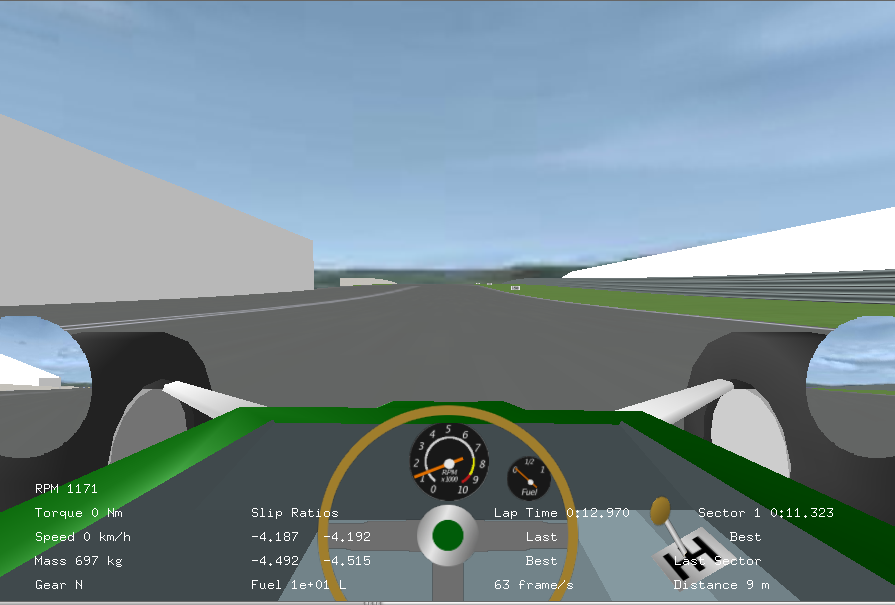
Vamos, Opensource Automotive Simulation Framework

Vamos is a very young project concentrating on being an automotive simulation framework with an emphasis on thorough physical modeling and good C++ design. Vamos includes a real-time, first-person, 3-D driving application.


It also includes a number of cool real-world locations, with tracks such as Germany’s Nurburgring and Japan’s Suzuka Circuit, among others. However, this won’t be a major draw card of authenticity just yet, as the graphics are still at a level comparable to a 286, and the cars resemble something more like what Postman Pat would drive. As a result, the project’s author is inviting anyone to contribute to the effort. Still, it looks promising, especially as parts of its code are being borrowed from another project.

For more info and download this game engine, feel free to visit here.

Running Linux on Windows XP natively with coLinux

Cooperative Linux is the first working free and open source method for optimally running Linux on Microsoft Windows natively. More generally, Cooperative Linux (short-named coLinux) is a port of the Linux kernel that allows it to run cooperatively alongside another operating system on a single machine.

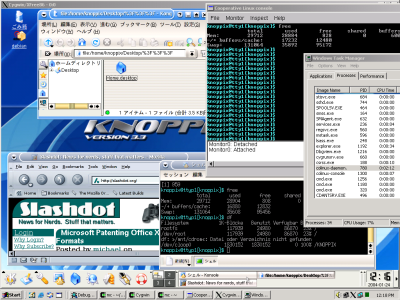
For instance, it allows one to freely run Linux on Windows 2000/XP, without using a commercial PC virtualization software such as VMware, in a way which is much more optimal than using any general purpose PC virtualization software. In its current condition, it allows us to run the KNOPPIX Japanese Edition on Windows.

Unlike in other Linux virtualization solutions such as User Mode Linux (or the forementioned VMware), special driver software on the host operating system is used to execute the coLinux kernel in a privileged mode (known as ring 0 or supervisor mode).

By constantly switching the machine's state between the host OS state and and the coLinux kernel state, coLinux is given full control of the physical machine's MMU (i.e, paging and protection) in its own specially allocated address space, and is able to act just like a native kernel, achieving almost the same performance and functionality that can be expected from a regular Linux which could have ran on the same machine standalone.


Since coLinux uses the same binary format for user-space executables as native Linux, coLinux can load and run an existing unmodified Linux distribution concurrently with the host OS.

To cooperatively share hardware with the host operating system, coLinux does not access I/O devices directly. Instead, it interfaces with emulated devices provided by the coLinux drivers in the host OS. For example, a regular file in Windows can be used as a block device in coLinux. All real hardware interrupts are transparently forwarded to the host OS, so this way the host OS's control of the real hardware is not being disturbed and thus it continues to run smoothly.

Unlike User Mode Linux, coLinux always utilizes only one process of the host OS for all its Linux processes, privately managing their scheduling, resources, and faults in a manner which is contained and entirely independent of the way the host OS is implemented. In fact, coLinux only requires a very small set of commonly exported primitives from the host OS kernel in order to work, thus, it can be rather easily ported to run under any operating system, such as Solaris, or even Linux itself.

Try to use coLinux now by downloading it at here.

Highlights of Kubuntu 8.04.1

Kubuntu is an official derivative of Ubuntu using the KDE environment instead of GNOME. It is part of the Ubuntu project and uses the same underlying system. It is an exciting distribution that showcases the full potential of the KDE desktop. Kubuntu shares the same repositories as Ubuntu, and relies on the same underlying architecture.


The K Desktop Environment
A powerful graphical desktop environment, combines the ease of use, contemporary functionality, and outstanding graphical design with the technological superiority of the Kubuntu operating system. KDE version 3.5.5 is the current stable release and Kubuntu 6.10 is the first distribution to include it.

Photo Management

Digikam is now included by default. This advanced digital photo management application provides you with the tools necessary to view, manage, edit, enhance, organise, tag and share photographs. Organising both photos and photo albums is a snap with Digikam as it allows you to sort chronologically, by directory layout, or by custom collections.

Power Management

Kubuntu received a new power management overhaul with the latest release. Guidance, the power management system, allows users to select various functions to control the power of their portable computing system, whether it is controlling the brightness of the display during low battery, locking the system upon closing the lid or controlling access to multiple batteries.

Easy Networking and Printer Sharing

Zeroconf and print sharing let you browse the local network for available services. Both are now simple to setup and maintain requiring nothing more than ticking a box to enable the feature.
Accessibility Profiles


Kubuntu now offers users the ability to use a preconfigured accessibility profile depending on the type of disability right from the initial point of setup. This provides users the accessibility features they need in order to not only install the Kubuntu 6.10 operating system but to use the system on a daily basis for all of their computing needs. Press F5 at the CD boot screen to choose a profile.

You can get Kubuntu now by visiting here.

Damn Small Linux 4.4.4 is out

Damn Small Linux (DSL) is a very versatile 50MB mini desktop oriented Linux distribution. DSL was originally developed as an experiment to see how many usable desktop applications can fit inside a 50MB live CD. It was at first just a personal tool/toy. But over time Damn Small Linux grew into a community project with hundreds of development hours put into refinements including a fully automated remote and local application installation system and a very versatile backup and restore system which may be used with any writable media including a hard drive, a floppy drive, or a USB device.


DSL has a nearly complete desktop, and many command line tools. All applications are chosen with the best balance of functionality, size and speed. Damn Small also has the ability to act as an SSH/FTP/HTTPD server right off of a live CD. In our quest to save space and have a fully functional desktop we've made many GUI administration tools which are fast yet still easy to use. What does DSL have?

XMMS (MP3, CD Music, and MPEG), FTP client, Dillo web browser, Netrik web browser, FireFox, spreadsheet, Sylpheed email, spellcheck (US English), a word-processor (Ted), three editors (Beaver, Vim, and Nano [Pico clone]), graphics editing and viewing (Xpaint, and xzgv), Xpdf (PDF Viewer), emelFM (file manager), Naim (AIM, ICQ, IRC), VNCviwer, Rdesktop, SSH/SCP server and client, DHCP client, PPP, PPPoE (ADSL), a web server, calculator, generic and GhostScript printer support, NFS, Fluxbox and JWM window managers, games, system monitoring apps, a host of command line tools, USB support, and pcmcia support, some wireless support.

Damn Small is small enough and smart enough to do the following things:

  • Boot from a business card CD as a live linux distribution (LiveCD)
  • Boot from a USB pen drive
  • Boot from within a host operating system (that's right, it can run inside Windows)
  • Run very nicely from an IDE Compact Flash drive via a method we call "frugal install"
  • Transform into a Debian OS with a traditional hard drive install
  • Run light enough to power a 486DX with 16MB of Ram
  • Run fully in RAM with as little as 128MB (you will be amazed at how fast your computer can be!)
  • Modularly grow -- DSL is highly extendable without the need to customize.

Download this new DSL version at Here.

The Best OpenSource Firewall and Gateway: Untangle

Untangle is the free & open source alternative to Sonicwall. In addition to the basics (Firewall, VPN, IPS & routing), Untangle makes it easier to block spam, spyware, viruses, phishing, porn, gambling, MySpace, Facebook, IM, peer-2-peer & much, much more.

Features:

  • Runs at the gateway... No clients to install!
  • Easy to use: Intuitive GUI, logging, reporting & automatic signature updates
  • Installs on standard Intel/AMD hardware


Highlights:

  • Comprehensive Security Protect the network from spyware, spam, viruses, hackers and identity thieves. Untangle is network security, web security, mail security & secure remote access integrated into one platform. And as an open source platform, new applications can be added at anytime, so Untangle has you covered when the next new networking technology is developed.
  • Increased Productivity Block time-wasting websites & applications like MySpace, instant messenger, online games & gambling. Untangle even blocks the most difficult port-hopping applications dead in their tracks.
  • Increased Visibility Great reporting provides the visibility and data necessary to monitor behavior and track incidents at the network, user, and client levels.
  • Easier to Use Each application comes pre-configured for business use and Untangle’s intuitive “virtual rack” GUI makes additional fine-tuning a snap.

Hardware Requirements:

  • The Untangle Server requires a dedicated PC installed at the gateway to your network.
  • Your hardware does not need an operating system - the Untangle Server installs its own operating system.
  • The Untangle Server software completely erases any content or data that may exist on your PC hard drive.
Download now this nice tool at Here.

Delicious Digg Technorati Reddit Furl BlinkList Yahoo! NewsVine Netscape Google Live Bookmark Netvouz Squidoo StumbleUpon Magnolia.png